When working on projects with Git, things can get messy pretty quickly if everyone just commits directly to main. That’s where branching strategies come in. They basically define how teams organize their work in Git, so development stays structured instead of chaotic.
Different teams prefer different strategies depending on team size, release cycles, CI/CD setup, etc. So in this post I’m just going through some of the commonly used ones and what they’re good for.
1. Feature Branching Link to heading
This is probably the most straightforward branching strategy.
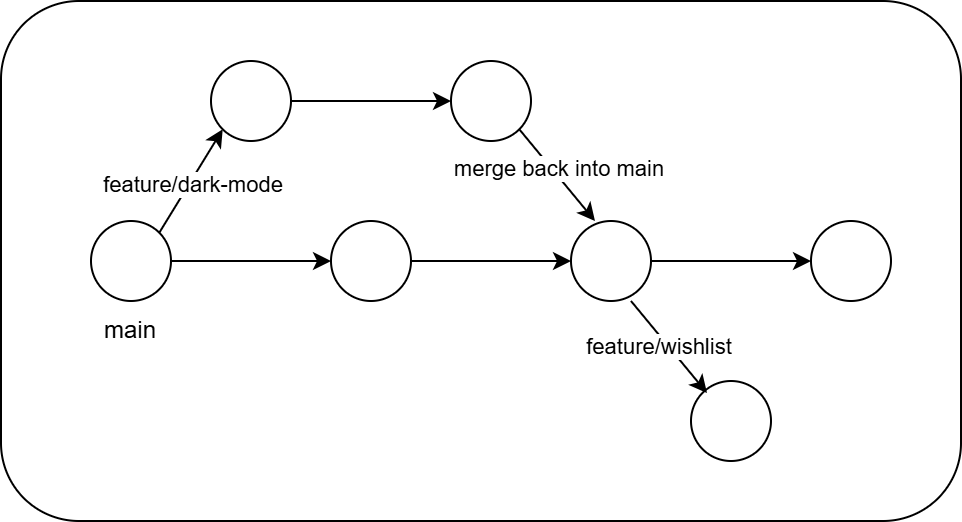
The idea is simple: every feature or bug fix gets its own branch. Instead of working directly on main, you branch off, finish your work there, and then merge it back once it’s done.
How it usually works Link to heading
- Create a new branch from
main. - Work on the feature or bug fix there.
- Push changes and open a pull request.
- Merge it back into
mainonce everything looks good. - Delete the branch afterwards.
Example branch names Link to heading
feature/wishlist
feature/auth
bugfix/login-error
Overall, this approach keeps things pretty clean and organized. Everyone works in their own branches without stepping on each other’s toes. It’s super common in open-source and small team setups because it’s simple to understand and easy to manage. The only thing to watch out for is letting branches live too long — because once they drift too far from main, merge conflicts start showing up and then it becomes a bit annoying to deal with.
2. Git Flow Link to heading
Now things start getting a bit more structured.
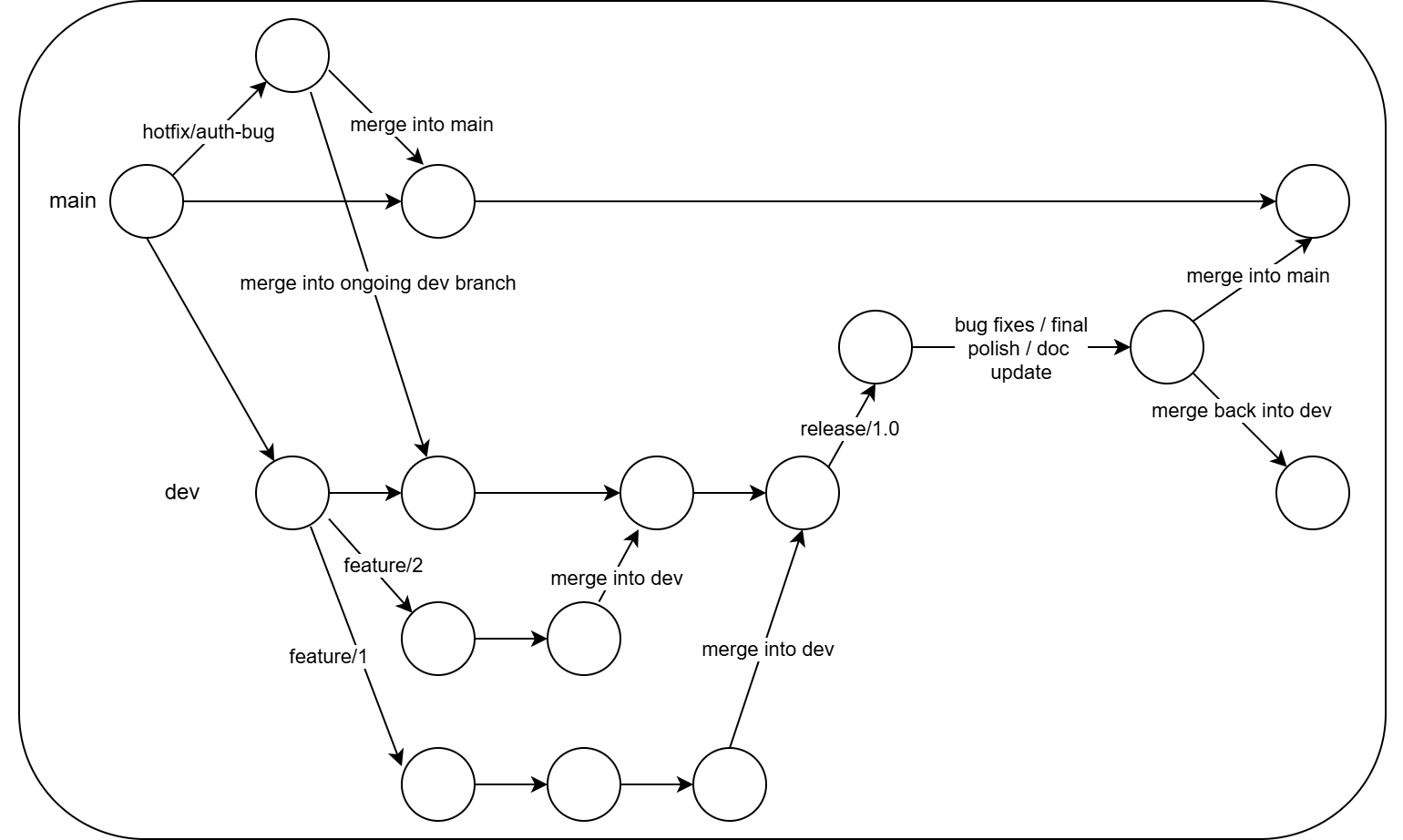
Git Flow introduces multiple long-lived branches to separate development from production releases.
The basic idea Link to heading
Instead of just main, you also have a develop branch.
main      → production-ready code
develop   → ongoing development
And then you create temporary branches for specific tasks.
feature/*
release/*
hotfix/*
Typical workflow Link to heading
- Feature branches start from
develop. - Once finished, they merge back into
develop. - When preparing a release, a
releasebranch is created. - Urgent fixes go through
hotfixbranches that merge into bothmainanddevelop.
Git Flow is a bit more “enterprise-ish” compared to the previous one. It introduces more structure so development, releases, and hotfixes all have their own lanes. This works nicely when teams are bigger or when projects follow proper release cycles. That said, it can feel a little heavy for smaller projects because managing all those branches adds extra overhead.
3. GitHub Flow Link to heading
GitHub Flow is basically a simplified version of Git Flow.
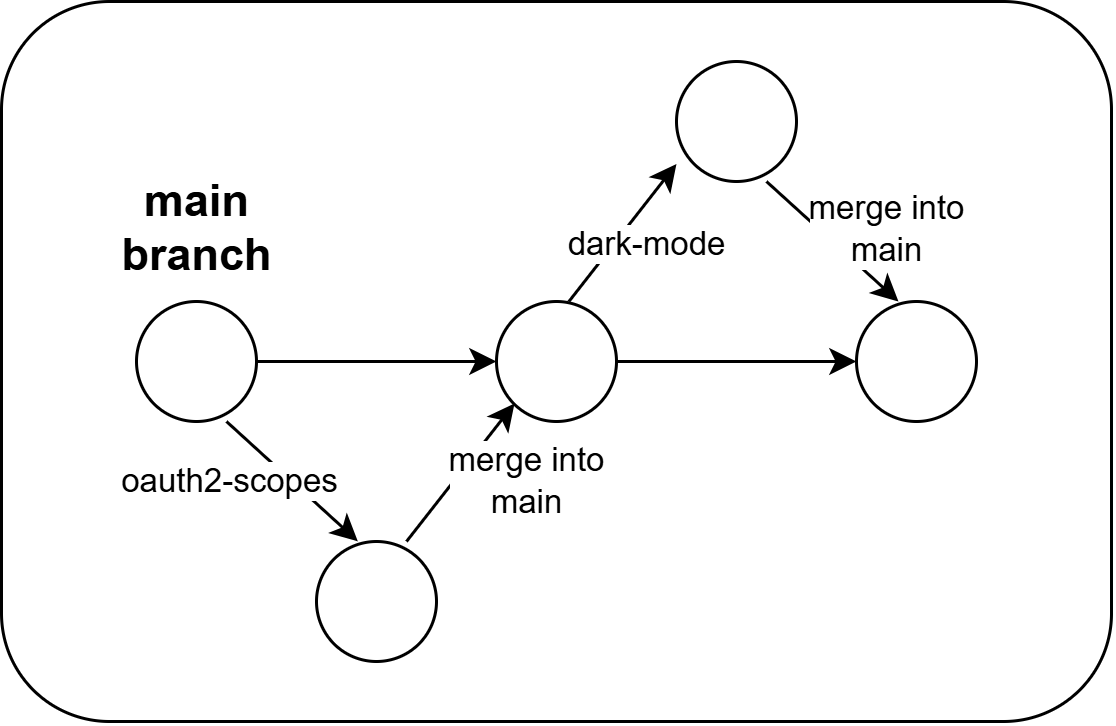
Instead of having multiple long-lived branches, you only keep one main branch.
main
Everything else happens through short-lived branches.
Workflow Link to heading
- Create a branch from
main. - Work on your feature.
- Open a pull request.
- Review and test the changes.
- Merge back into
main.
That’s it.
This workflow is intentionally kept lightweight. There’s no develop, no release branches — just main and short-lived branches. It works really well for projects where changes are deployed frequently. A lot of SaaS companies and open-source repos use this because it keeps the development process fast and simple without too much process overhead.
4. GitLab Flow Link to heading
GitLab Flow focuses more on deployment environments.
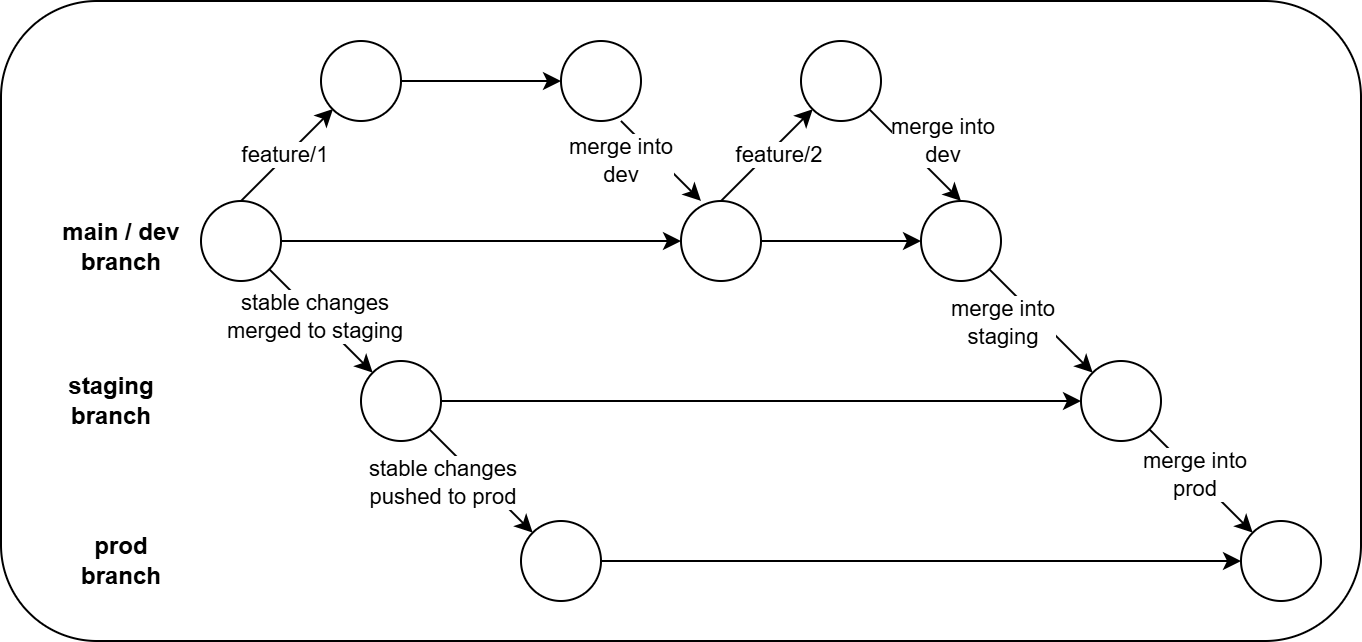
Instead of organizing branches purely around development stages, it aligns them with environments like dev, staging, and prod.
Typical structure Link to heading
dev
staging
prod
Feature branches start from dev.
Example:
feature/invoice-module
bugfix/api-timeout
Then code moves through environments:
dev → staging → prod
Each stage can trigger deployments through CI/CD pipelines.
This approach fits nicely when your deployment pipeline already has multiple environments. Instead of treating Git purely as a development tool, it also reflects how your software moves through environments before reaching production. It works well in teams doing DevOps-heavy workflows, especially when CI/CD pipelines are tightly integrated with the repository.
5. Trunk-Based Development Link to heading
This one takes almost the opposite approach of Git Flow.
Instead of having multiple long-lived branches, everything revolves around a single branch. I like to think of it in terms of Marvels’ Multiverse. (Tbh, this would go with any other branching strategy as well, just that this one feels more like it - to me).
main (or trunk)
Developers either commit directly or use very short-lived branches. In this strategy changes are integrated very frequently. A lot of incomplete features are hidden behind feature flags, but mostly the practice is to merge the code that is stable and can be taken to the next stage in the process.
Example:
feature/checkout-redesign
Feature flags might look like:
enableNewCheckout
showBetaBanner
This allows unfinished features to exist in production code without actually being visible to users.
Trunk-based development is all about moving fast and integrating changes continuously. Instead of long-lived branches floating around, everything merges back to main quickly. Teams rely heavily on automated testing and feature flags so unfinished work doesn’t break production. It’s a very fast-paced workflow and works great for teams doing continuous delivery, but it also demands solid CI pipelines and good testing discipline to keep things stable.
Ps: Many big projects generally use Trunk-based Development as their de-facto standard. As a matter of fact, you can check out a complete guide on following TBD at https://trunkbaseddevelopment.com/
FAQs Link to heading
Q. Do branching strategies change over time? Link to heading
Yes, absolutely.
A project might start simple and then adopt a more structured workflow later. Changes usually happen because of:
- Team size increasing
- CI/CD pipelines evolving
- Release processes becoming more formal
Q. Can multiple strategies exist in one repository? Link to heading
Technically yes, but it can get confusing.
Pros
- Flexibility
- Teams can adapt workflows
Cons
- Harder coordination
- Inconsistent development practices
MonoRepo vs PolyRepo Link to heading
While reading about branching strategies, there are also some commonly used repository patterns when you work on big projects. MonoRepo and PolyRepo are one of those…
Monorepo Link to heading
All projects or services live in one repository, usually organized in folders.
Example:
repo/
 ├ service-a
 ├ service-b
 └ shared-libs
Polyrepo Link to heading
Each project has its own separate repository. This ones’ common in micro-services based architecture… where feature-based services are kept in separate branches and different teams are working on it.
Example:
repo-service-a
repo-service-b
repo-shared-lib
Strategy Comparison Link to heading
| Strategy | Small Teams | Large Teams | Growing Teams | CI/CD Friendly | Visual History |
|---|---|---|---|---|---|
| Git Flow | Overkill | Yes | Yes | Needs careful setup | Good |
| Trunk-Based Dev | Yes | Yes | Maybe | Excellent | Harder |
| Feature Branching | Yes | Not ideal | Not ideal | Limited | Good |
| GitHub Flow | Yes | Not ideal | Not ideal | Limited | Good |
| GitLab Flow | Yes | Maybe | Yes | Excellent | Good |
If you like what you read… I am sure you would also like my yapping over X. If you have any comments or questions, feel free to reach out to me privately.
Sayonara.